Are Cookies Dangerous
in category Windows Support -> Web Browsers -> Are Cookies Dangerous. Updated at Sun, 22 Nov 2020 12:24:14 EST
Not all cookies track you. There is absolutely no reason to fear cookies, you just need to browse smarter.
Not all cookies track you around the web. In fact, without cookies enabled in your web browser, you will not be able to access your email or other accounts that require a log in.
Advertisers, however, are notorious for tracking cookies that do follow you around the internet trying to sell you stuff. It stands to reason that they are also accumulating a database full of what they perceive to be information about you and the types of things you like, view, or purchase. I say perceive, because it also stands to reason that simply because you landed on a page does not necessarily mean you like or appreciate the content on it.
How to limit the ability of tracking cookies

It's good practice to set your web browser to delete cookies and other browsing data when you close it.
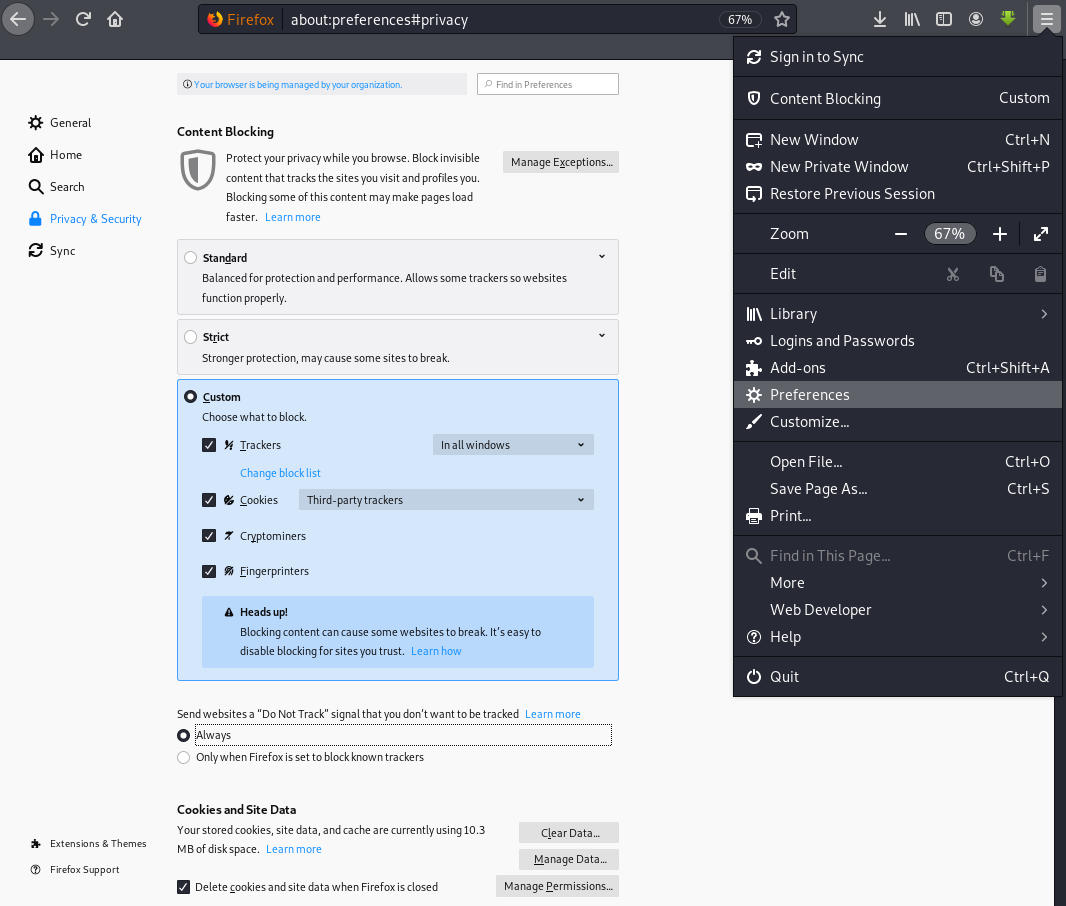
In the upper right hand corner or your web browser you'll see an tool icon, or 3 lines or 3 dots. Click that to open the settings menu. Then, in the drop down, click on Settings, or Preferences, and then click on Security inside the settings area. Look through the settings. You will see a checkbox to delete cookies and data when the browser is closed. Keep that checkbox checked and cookies (and videos you watched) will be deleted from your cache whenever you close the web browser.
You can also block 3rd party cookies. Those are the annoying tracking cookies that play the same ads over and over again when you're on the internet. And at any point, you can open settings, go to Privacy and Security, and delete your cache.
The image to the left is Chrome and the image below is FireFox.
Keywords
web browser cookies, tracking cookies, session cookies, secure cookies, http-only